

Does Chime have Zelle? That’s the big question I get asked a lot, especially from people who are new to digital banking. If you’re like me, you probably want to send or receive money quickly without worrying about extra fees or delays. Chime has become one of the most popular online banks, while Zelle is one of the fastest-growing money transfer services. Naturally, many of us wonder if we can use them together.
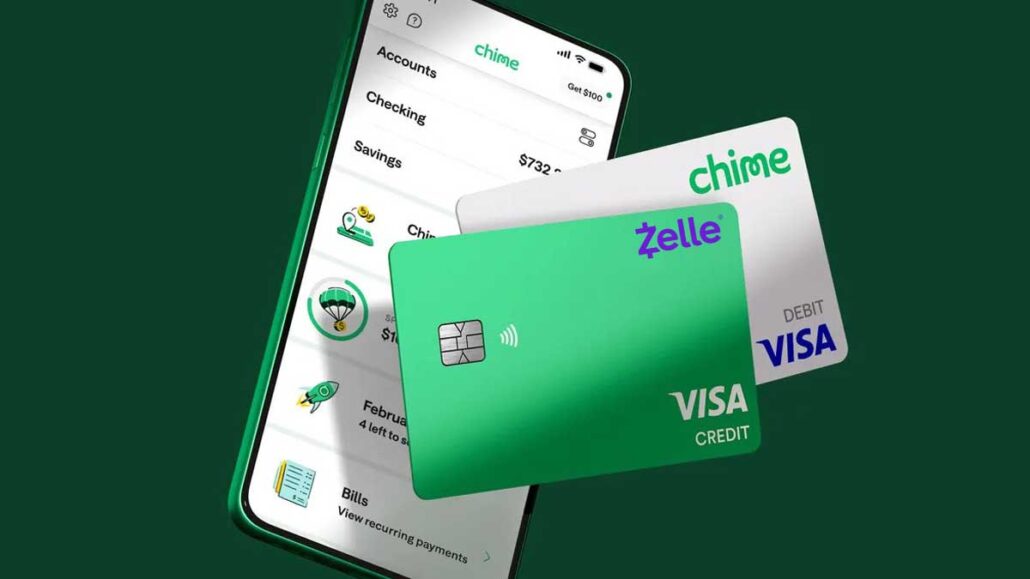
Chime doesn’t officially partner with Zelle. That might sound like a dealbreaker, but don’t worry, I’m going to walk you through everything you need to know. From workarounds to alternatives, I’ll explain exactly what’s possible, what’s not, and what you should do if you rely on both platforms. By the end of this guide, you’ll know how Chime and Zelle fit together in real life.
- How to Apply for a Cash App Card
- How to Get Cash With a Credit Card
- Does Venmo Notify if You Look at Someone’s Profile
- How to Block Someone on Zelle
- www.parentpay.com Login – Access to Your ParentPay Account
- OneMain Financial Brightway Credit Card – Benefits, Features & Application
- What Credit Unions Use Zelle
- www.synchrony.com Login – Securely log in to your Synchrony Account
- Bank of America Checking Account – Open a Checking Account
- How to Check Zelle Transaction History on Chase Website
- What is Checking Account? A Simple Guide
- How to Transfer Money from Chime to Cash App
- Cash a Check Online Instantly Without Ingo
- How Does Zelle Make Money
- How to Get Free Money on Cash App
Does Chime Have Zelle Directly?
No, Chime does not directly support Zelle. Unlike banks such as Chase, Wells Fargo, or Bank of America, Chime hasn’t partnered with Zelle to integrate the service within its app.
This means that if you log into your Chime app and look for a Zelle option, you won’t find it. But that doesn’t mean all hope is lost. Some users have figured out workarounds by linking their Chime debit card to the Zelle app. However, these methods aren’t always reliable, and sometimes Zelle rejects Chime as a supported bank.
Why doesn’t Chime support Zelle directly? There are a few possible reasons:
- Business Model Differences: Chime pushes its own “Pay Anyone” feature, which competes with Zelle.
- Banking Infrastructure: Zelle partners with traditional banks, while Chime operates differently as a neobank.
- Security Considerations: P2P transactions come with risks, and Chime may prefer controlling transfers within its own system.
So, if you’re expecting seamless Zelle transfers with Chime, you might run into issues. But don’t worry. I’ll break down what actually works in the next section.
Can You Use Chime Debit Card with Zelle?
This is the question most people have after hearing Chime doesn’t officially support Zelle: “Can I just use my Chime debit card on the Zelle app?” The answer is a bit tricky.
Yes, in some cases, you can add your Chime debit card to the Zelle app. If Zelle accepts it, you’ll be able to send and receive money. However, many users have reported that their Chime card gets rejected, or that Zelle doesn’t recognize Chime as a valid bank. It’s hit or miss.
Here’s a step-by-step way you can try:
- Download the Zelle app from your phone’s app store.
- Open it and select “Don’t see your bank?”
- Enter your Chime debit card details manually.
- If Zelle acepts it, you’re good to go. If not, you’ll get an error.
But here’s the problem, you can’t rely on it. Even if it works today, Zelle may stop supporting it tomorrow. That’s because Chime isn’t an official partner, and Zelle’s system was designed to work with big banks.
So, can you use your Chime debit card with Zelle? Sometimes, but not always. If you want guaranteed reliability, you’re better off sticking with Chime’s built-in money transfer options.
Alternatives to Using Zelle with Chime
Since Chime doesn’t officially connect with Zelle, you might be wondering what your options are. The good news is that Chime has its own feature called Pay Anyone, which can act as a solid alternative. I’ve personally used it, and I can tell you, it works pretty well if you’re looking for speed and simplicity.
Here’s how Pay Anyone works:
- You open your Chime app, select “Pay Anyone,” and enter your friend’s phone number or email.
- If your friend has Chime, they’ll get the money instantly.
- If your friend doesn’t have Chime, they’ll still get a link where they can enter their debit card info and claim the money.
The best part? It’s free. No extra charges, no delays, your money goes directly from your account to theirs.
Now, let’s compare Chime’s Pay Anyone with Zelle:
| Feature | Chime Pay Anyone | Zelle |
| Speed | Instant (for Chime users) | Almost instant |
| Fees | None | None |
| Supported Banks | Works with any debit card | Only works if both bank support Zelle |
| Reliability | High | High (but only if banks support it) |
So, while Zelle might be faster across big banks, Chime Pay Anyone is actually more flexible because it doesn’t require the other person to have a specific bank account. Think of it this way: Zelle is like a members-only club, but Chime Pay Anyone is open to everyone.
If Zelle doesn’t work with your Chime debit card, using Pay Anyone is probably your best alternative.
Does Chime Work with Venmo and Cash App?
Even though Chime doesn’t directly support Zelle, it works pretty smoothly with other payment apps like Venmo and Cash App.
Here’s why that matters:
- Venmo: You can link your Chime debit card or routing number to Venmo. This lets you transfer money back and forth easily. Venmo also has a social feed, which some people love for splitting bills or sending fun payment notes.
- Cash App: Just like Venmo, you can link Chime as a bank account or use the debit card. Cash App is especially handy if you want instant transfers to your Chime account.
While Chime and Zelle might not be the best match, you’ve got great alternatives with Venmo and Cash App. It’s like Zelle closed one door, but Chime opened two more.
How Do I Connect Zelle to My Chime Account?
Now, let’s get real here. If you’re determined to connect Zelle to Chime, there are a couple of ways you can try. But remember, it’s not guaranteed to work 100%.
Option 1: Add Your Chime Debit Card to Zelle
- Download the Zelle app.
- Open it and select “Don’t see your bank?”
- Enter your Chime debit card details.
- If accepted, you can start sending and receiving money.
Option 2: Link Chime Through a Traditional Bank
- Some people use a traditional bank account as a middleman. For example, you could:
- Send money from Zelle to your traditional bank.
- Then transfer it from your traditional bank to Chime.
- Yes, it’s an extra step, but it works if Zelle won’t accept your Chime card directly.
Option 3: Skip Zelle and Use Pay Anyone
If both options above fail, it might just be easier to use Chime’s built-in Pay Anyone feature. It’s faster and more reliable in most cases.
So, can you connect Zelle to Chime? Sometimes, but don’t depend on it. You’ll likely find yourself using alternatives more often than not.
How Secure is Chime and Zelle?
When it comes to money, security is everything. Nobody wants to risk losing their hard-earned cash. Luckily, both Chime and Zelle take security seriously, but they work in slightly different ways.
Chime’s Security Features:
- Chime uses strong encryption to protect your information.
- You get instant transaction alerts whenever money moves.
- You can freeze your debit card instantly in the app if you lose it.
- FDIC insurance protects deposits up to $250,000.
Zelle’s Security Features:
Zelle also uses encryption to keep payments safe.
It works directly between banks, which makes transfers fast and harder to intercept.
However, Zelle doesn’t offer fraud protection for sending money to strangers—you’re on your own if you send money to the wrong person.
Both Chime and Zelle are secure when you use them wisely. But you have to be careful. Only send money to people you trust, double-check details before sending, and never share your account info with strangers.
Can You Send Money from Zelle to Chime?
Here’s where things get interesting. Many people ask me, “Can I send money from Zelle to Chime?” and the answer depends on how you set things up. Since Chime doesn’t directly support Zelle, there’s no built-in option inside the Chime app to receive Zelle transfers. But that doesn’t mean it’s impossible.
If someone wants to send you money through Zelle, there are a couple of workarounds:
1. Using the Chime Debit Card on Zelle
If Zelle allows you to link your Chime debit card, you can receive money directly into your Chime account. This is the simplest option, but like I mentioned earlier, it doesn’t always work. Some users get approved, while others see error messages.
2. Using a Linked Bank Account as a Bridge
This is the most reliable method, even though it takes an extra step. Here’s how it works:
- Link Zelle to a traditional bank account that supports it (like Chase or Wells Fargo).
- Receive the Zelle payment into that account.
- Transfer the money from the traditional bank account to Chime using ACH transfer or your Chime debit card.
It’s not instant, but it gets the job done.
3. Asking the Sender to Use Chime’s Pay Anyone Feature Instead
If the sender also has Chime, you’re better off skipping Zelle altogether and using Chime’s Pay Anyone option. It’s faster, easier, and doesn’t require any extra steps.
So, the answer is yes, you can send money from Zelle to Chime, but not directly. It’s like trying to fit a square peg into a round hole. You need a workaround to make it fit.
Pros and Cons of Using Chime with Zelle
Pros:
- Possible to link your Chime debit card to Zelle in some cases.
- You can still move money between Zelle and Chime using a traditional bank as a bridge.
- Gives flexibility if your friends or family only use Zelle.
Cons:
- Chime isn’t an official Zelle partner, so it’s unreliable.
- Sometimes debit card linking doesn’t work.
- Using a traditional bank as a middle step slows things down.
- Zelle doesn’t offer purchase protection, which could be risky.
If you’re someone who values speed and simplicity, Chime’s Pay Anyone feature is hands-down a better option. But if you really need to use Zelle, you’ll need to accept the limitations.
Think of it like trying to use an iPhone charger on an Android phone, you can make it work with an adapter, but it’s not as smooth as using the right cable.
Best Alternatives to Zelle for Chime Users
If Zelle feels like a dead end with Chime, don’t worry, you’ve got plenty of alternatives. Here are the best ones I recommend:
1. Chime Pay Anyone
- Instant transfers.
- Free to use.
- Works even if the other person doesn’t have Chime.
2. Venmo
- Popular for splitting bills and fun payments.
- Works smoothly with Chime debit card.
- Small fee for instant transfers, but free for standard transfers.
3. Cash App
- Great for quick money transfers.
- Easy to connect with Chime.
- Also offers investing and Bitcoin features.
4. PayPal
- Reliable and widely accepted.
- Works with Chime debit card.
- Better for online shopping and business transactions.
So even if Chime doesn’t fully support Zelle, you won’t be stuck. In fact, these alternatives often provide more flexibility. It’s like having different routes to the same destination, Zelle may not be the highway for Chime users, but there are plenty of side roads that still get you there.
Tips for Smooth Money Transfers with Chime
If you’re like me, you don’t just want to know if something works, you want it to work smoothly. With Chime, transferring money can be fast and stress-free, but only if you know a few tricks.
1. Always Double-Check Details
It sounds simple, but you’d be surprised how many times money gets sent to the wrong email or phone number. Unlike some other services, once a transfer is out, it’s hard to reverse. So before hitting “send,” take a second look at the info.
2. Use Chime’s Pay Anyone for Speed
If the person you’re paying has Chime, money transfers are instant. If they don’t, they’ll still get a claim link. From what I’ve seen, most people can cash out quickly with their debit card. It’s often faster than waiting on Zelle or a bank transfer.
3. Keep a Backup Payment App
Since Chime doesn’t officially support Zelle, it helps to keep Venmo, Cash App, or PayPal ready. I personally have all three connected to Chime, so no matter what someone else prefers, I can pay them without delays.
4. Watch Out for Transfer Limits
Chime does have daily and monthly limits for sending money. If you’re planning to move a large amount, check the limits ahead of time. Nothing’s worse than finding out mid-transfer that you’ve hit the cap.
5. Use Direct Deposit for Stability
If you get paid through Chime, use direct deposit. Not only do you get your paycheck early, but it also makes sure your balance is ready for transfers whenever you need it.
6. Stay Alert for Scams
This one’s big. Scammers love peer-to-peer apps because once money is gone, it’s gone. Only send to people you know and trust. If a deal online looks too good to be true, it probably is.
With a little preparation, Chime makes money transfers smooth, reliable, and stress-free. It’s like learning the shortcuts in your neighborhood, once you know the fastest routes, you’ll never go back to the long way.
FAQs
Does Chime work with Zelle?
Not directly. Chime isn’t an official Zelle partner, but you may be able to link your Chime debit card in the Zelle app. Results vary.
2. Can I use Chime debit card with Zelle app?
Yes, you can try adding it manually. Sometimes it works, sometimes it doesn’t. If it’s accepted, you can use Zelle with your Chime account.
3. Does Chime Pay Anyone work with Zelle & Venmo?
No, Pay Anyone is Chime’s own feature and doesn’t connect with Zelle or Venmo. But you can use Venmo separately by linking your Chime debit card.
4. How do I connect Zelle to my Chime account?
You can try by adding your Chime debit card to the Zelle app. If that doesn’t work, you’ll need to use a traditional bank account as a middleman.
5. How secure is Chime & Zelle?
Both are secure when used correctly. Chime has FDIC insurance and card-freeze features, while Zelle uses encryption. But always send money only to people you trust.
6. Can you send money from Zelle to Chime?
Not directly. You’ll need to either link your Chime debit card (if Zelle accepts it) or use another bank as a bridge.
Conclusion
Does Chime have Zelle? The short answer is no, not directly. You won’t find a built-in Zelle option inside the Chime app. But that doesn’t mean you’re out of luck.
You can sometimes connect your Chime debit card to the Zelle app, but it’s not guaranteed. If that fails, you can always use a traditional bank account as a bridge or skip Zelle altogether and use Chime’s Pay Anyone feature. On top of that, Chime works smoothly with Venmo, Cash App, and PayPal, so you’ve got plenty of alternatives.